Don’t let important inquiries get buried in
sales emails.

Formchan is where your contact form sends its messages. AI reads each one and rates its importance. Quotes and real requests reach you right away, and sales emails are set aside for you.

Free for up to 100 messages a month. Keep the form you already have.

TRY FORMCHAN

From your form to an AI-organized inbox.

Choose a sample and send it. Try priority ratings, tags and reply drafts right here.

01 Your website form02 AI03 Inbox
Interactive demo

Your website form

Contact us

Inbox

3

Sample inquiries

# Contact usTo do

Office renovation with a $20,000 budget. Estimate needed next week.

★★★Inquiry

We are planning an office renovation with a budget of $20,000, ideally next April. Could you send an estimate and available meeting dates by next week?

AI's view

A concrete request with a budget, timeline and reply deadline deserves priority.

★3: Email notification after sorting

Sorted. Try an AI reply draft next.

This demo uses prepared sample results. Nothing is sent to AI, saved or emailed.

THE ACTUAL APP

Manage inquiries in the actual inbox.

Review messages and prepare replies in one inbox.

The Formchan inbox
Actual app screenshot. The inquiries shown are sample data.

FEATURES

What Formchan does

From reviewing messages to setting priorities and drafting replies, AI helps with your daily inquiries.

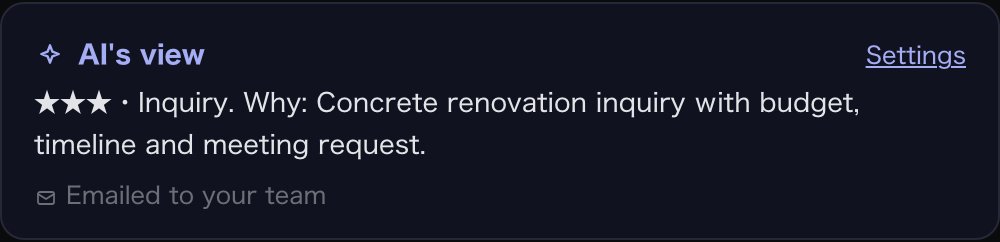
AI’s view: ★3, Inquiry, with the reason
Importance

See at a glance which message to answer first

AI reads each message and gives it ★1–3 for importance, plus tags such as Inquiry or Job application.

It also writes a one-line summary, so you know what a message is about before you open it.

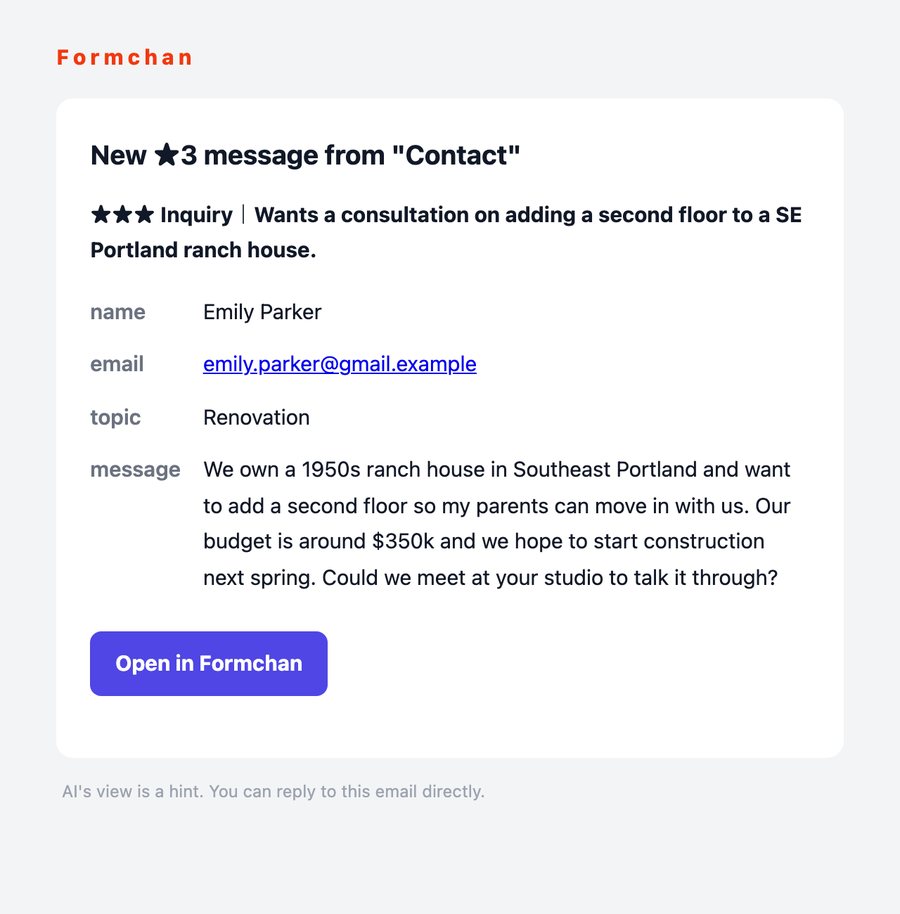
Email notification for a ★3 message
Notifications

Only urgent messages reach you right away

★3 messages are emailed to you the moment they arrive. Reply to that email and your answer goes straight to the sender.

★1 and ★2 come together in one summary email a day, at a time you choose.

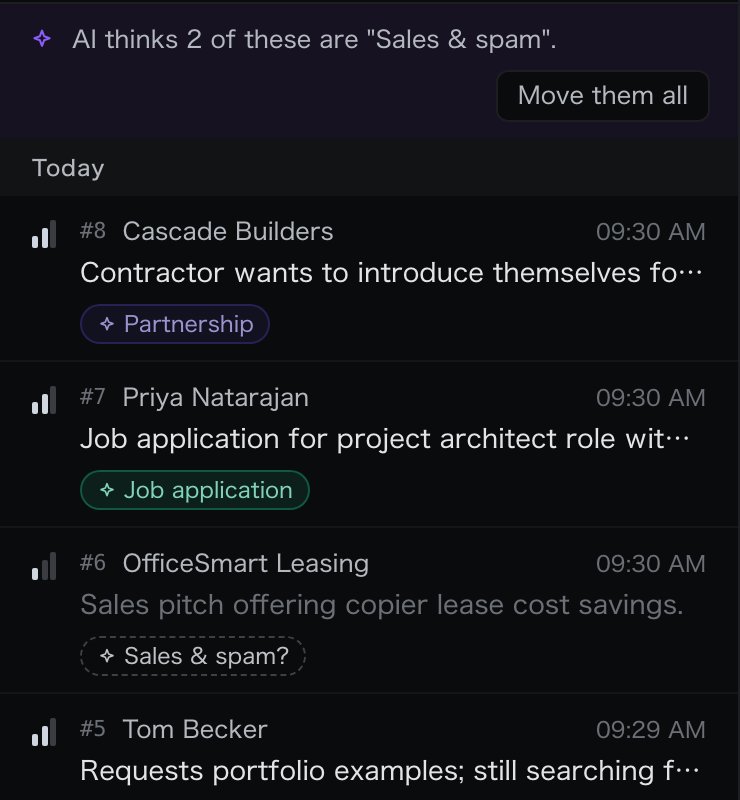
Inbox with suggested sales emails dimmed
Sales emails

Clear out sales emails with one button

Messages that look like sales or spam are dimmed in the inbox, and you can move them out all at once.

Once you mark a company as sales, its next messages get the same tag automatically.

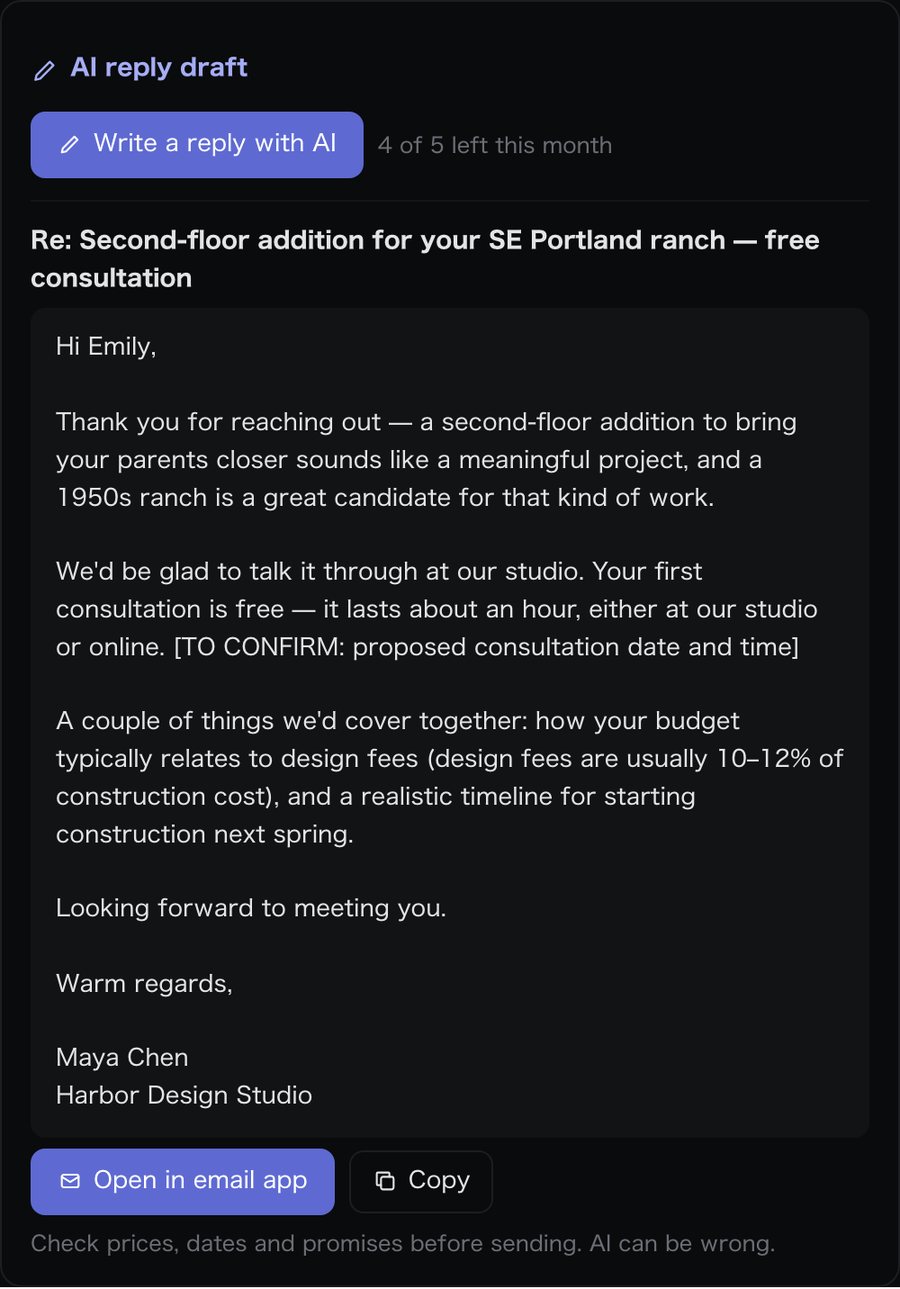
A reply draft written by AI
Reply drafts

AI drafts your replies, too

Add your company profile, prices and answers to common questions, and AI writes a reply draft with one click.

Anything you need to check, such as a date, is clearly marked. Fix it, then send from your email app.

Also included

Several forms, one inbox

Contact, careers and campaign forms arrive side by side.

Pro · Coming soon

Slack and Chatwork

Send ★3 messages to Slack, Chatwork, Microsoft Teams, Google Chat or Discord.

Your own tags

Describe a tag in words, and AI adds it when a message fits.

Pro · Coming soon

Work as a team

Invite colleagues and handle the same inbox together.

HOW IT WORKS

How it works

No need to rebuild your form. Change where it sends, and you are done.

  1. STEP 1

    Sign up free

    Enter the code sent to your email address. Your first form is ready when you log in.

  2. STEP 2

    Change the form’s action

    Set your form’s action to the URL shown in your dashboard. Works with WordPress, Webflow and hand-written HTML.

  3. STEP 3

    Get notified

    AI reads and sorts each message as it arrives. ★3 messages are emailed to you right away.

BUILD WITH AI

Building with AI? Give it the URL and the spec.

Give your coding AI the submission URL from your dashboard and this Markdown specification. It can connect your existing form or build a new one.

View instructions for your AI
Connect this website’s contact form to Formchan.

Submission URL: [paste the dedicated URL from the dashboard]
Integration specification: https://formchan.app/lp/integration-en.md

Read the specification and implement the integration while preserving the existing design. Create a form if there is none. Include validation, sending, success and error states, duplicate-submission prevention, and instructions for a test submission.

PRIVACY

How we handle your messages

The AI only sees the message text and the domain of the sender’s email address. Names and email addresses are never sent to it.

The AI runs on Cloudflare Workers AI, and your messages are not used to train it.

Going over your plan’s limit never stops your form. Extra messages skip the AI and are emailed to you as they are.

PRICING

Pricing

Try AI sorting for up to 100 messages and 5 reply drafts a month on the free plan.

Free

$0

To try it out

  • 100 messages a month
  • 2 forms
  • 30 days of history
  • 5 AI reply drafts a month
Start free

Pro

Coming soon

For the contact form of your business

  • 1,000 messages a month
  • Unlimited forms and tags
  • No time limit on history
  • Slack and Chatwork notifications
  • CSV export
  • Up to 3 members

Business

Coming soon

For teams and several sites

  • 10,000 messages a month
  • Webhooks
  • Auto-replies by tag
  • Choose the AI model and edit its instructions
  • Unlimited members
  • Unlimited AI reply drafts

Paid plans are not open yet. For now, everyone uses the free plan.

FAQ

Questions

Which forms can I use?

Any form where you can set the action (the URL it sends to). That includes WordPress, Webflow and forms you write in HTML.

What if the AI gets it wrong?

You can change ★ and tags in the inbox. Change a message to ★3 and it is emailed to you right then.

Are sales emails deleted?

No. They are only dimmed in the inbox, so you can look at them whenever you like.

Is my data used to train AI?

No. And names and email addresses are never sent to the AI.

What happens if I go over the free plan’s limit?

Your form keeps working. Messages over the limit skip the AI and are emailed to you as they are.

Give important inquiries your attention.

Free for up to 100 messages a month. All you need is an email address. No credit card.

Start free